> For the complete documentation index, see [llms.txt](https://docs-it.docbits.com/llms.txt). Markdown versions of documentation pages are available by appending `.md` to page URLs; this page is available as [Markdown](https://docs-it.docbits.com/administration-and-setup/settings/global-settings/document-types/regex.md).
# Espressioni Regolari
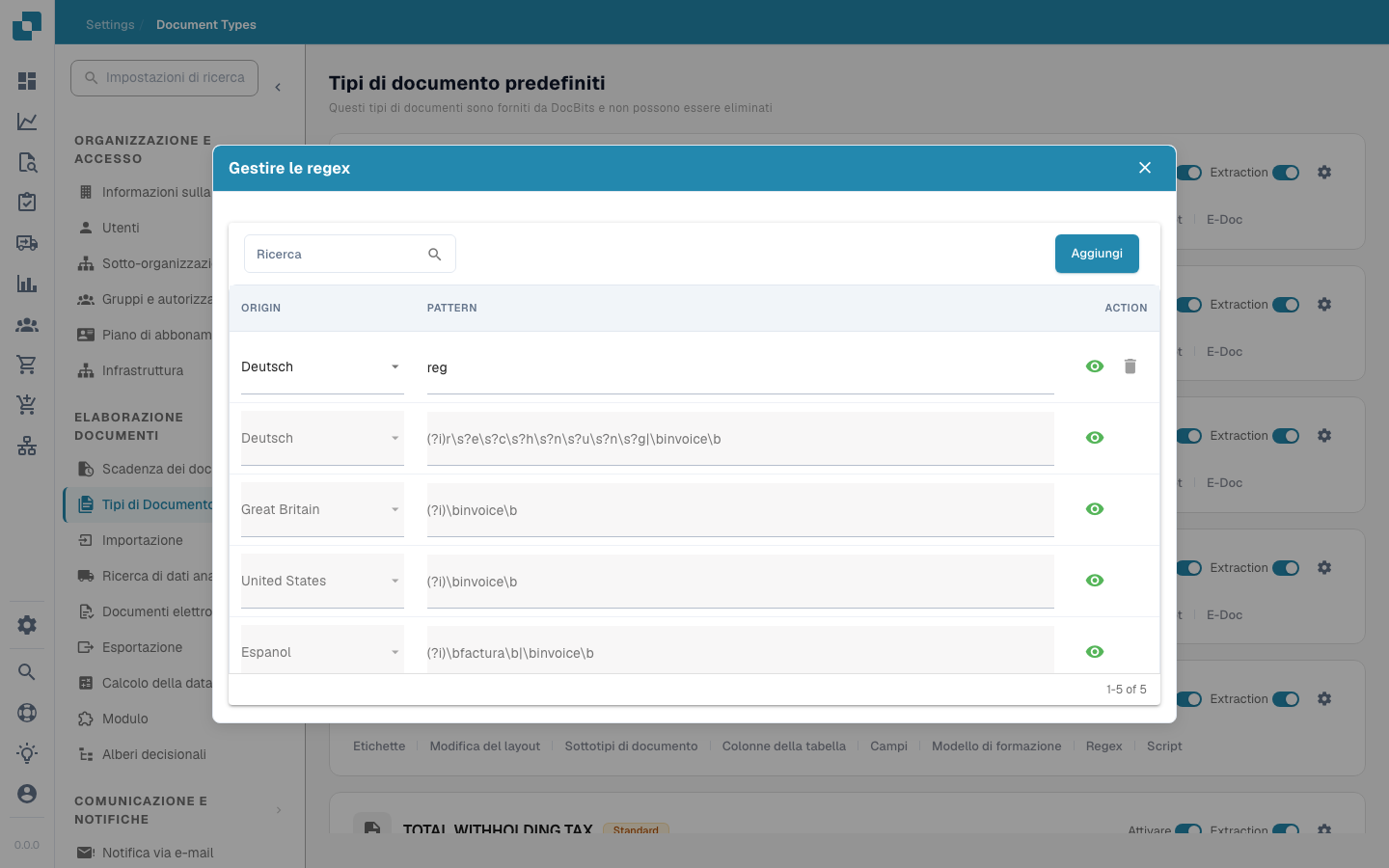
In DocBits, le impostazioni Regex consentono agli amministratori di definire modelli personalizzati che il sistema utilizza per trovare ed estrarre dati dai documenti. Questa funzionalità è particolarmente utile in situazioni in cui è necessario estrarre dati da testi non strutturati o quando i dati seguono un formato prevedibile che può essere catturato utilizzando modelli regex.
#### Funzionalità chiave e opzioni
1. **Gestione delle espressioni regolari**:
* **Aggiungi**: Consente di creare un nuovo modello regex per un tipo di documento specifico.
* **Salva modifiche**: Salva le modifiche alle configurazioni regex esistenti.
* **Modello**: Qui puoi definire il modello regex che corrisponde al formato dati specifico richiesto.
* **Origine**: È l'origine del documento - ad esempio, puoi definire un diverso Regex in Germania
{% @jira/embed url="" %}